
Introduction
A freezer dies at a franchise location in Phoenix. The alert fires. But the district manager's phone number changed last month, the backup contact is on vacation, and by the time someone notices, you've lost $15,000 in spoiled inventory.
This isn't a hypothetical. It happens every week to multi-location operators who assume their notification systems work. The truth is, having an alert system and having a monitored, tested escalation pathway are two different things. One gives you false confidence. The other keeps your operations running.
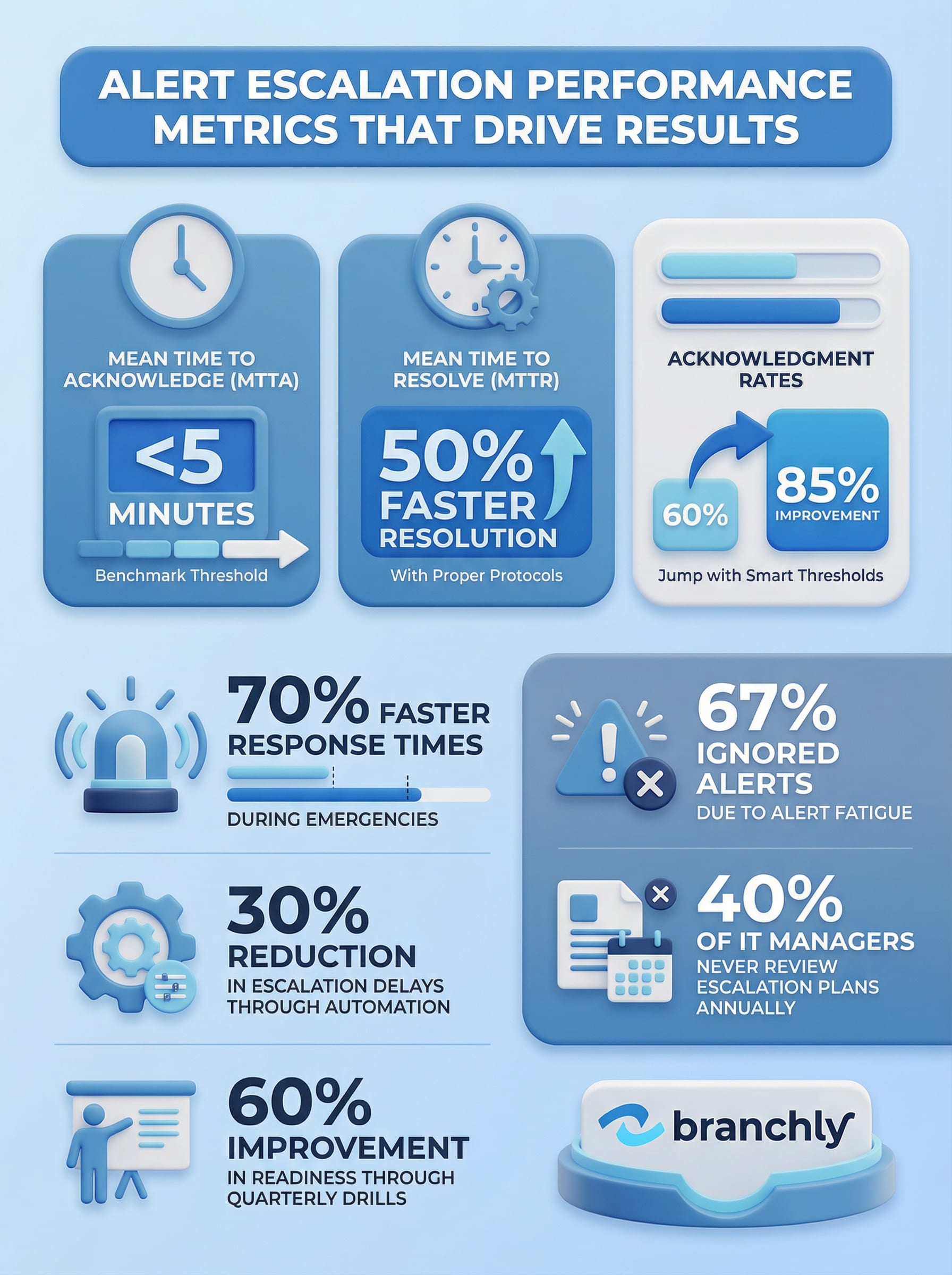
Organizations with properly tracked escalation pathways experience 70% faster response times during emergencies. Those with defined escalation protocols see 50% faster incident resolution. But getting there requires more than buying software. It takes structure, automation, and continuous improvement.
Build a Tiered Escalation Framework
The foundation of any trackable escalation system is a clear tier structure. Most organizations use three levels: low, medium, and high severity. But the severity rating alone doesn't tell responders what to do or who needs to act.
Start by mapping each incident type to a specific escalation path. A low-severity alert, like a minor point-of-sale glitch at one branch, might go to the on-site manager first, then the regional IT contact if unresolved in 30 minutes. A high-severity event, like a cyberattack affecting multiple locations, should immediately notify your IT director, operations lead, and executive sponsor simultaneously.
Create an escalation matrix that documents four things for every scenario: who gets the first alert, what triggers escalation to the next tier, how long responders have to acknowledge, and who serves as the final decision-maker. Without this clarity, people guess. And guessing during a crisis wastes time you don't have.
Define Escalation Triggers
Don't just say 'escalate if serious.' Specify conditions: unacknowledged after 5 minutes, system degradation exceeds 20%, or more than 3 locations affected. Clear thresholds remove ambiguity.
For multi-location teams, geography matters. Alerts should route based on location-specific contact hierarchies. A water main break in Denver shouldn't wake up your facilities manager in Miami. Use location codes or area definitions, similar to how emergency alert systems target specific regions, to make sure notifications reach the people who can actually help.
Automate Escalation to Eliminate Human Delay
Manual escalation is where most systems break down. Someone is supposed to call the next person if the first doesn't answer. But if the first responder is asleep, in a meeting, or dealing with another crisis, that call never happens.
Automated escalation removes the human bottleneck. If an alert isn't acknowledged within a set timeframe, the system automatically notifies the next person in the chain. For example, if your on-call engineer doesn't respond in five minutes, the system escalates to the backup and the team lead simultaneously. No one has to remember to do it. It just happens.
Set up service mappings so alerts route to the right functional team automatically. A database outage goes to your DBAs. An HVAC failure at a retail location goes to facilities, not IT. This seems obvious, but in practice, generic alert channels create confusion about who owns what.
Automation Cuts Escalation Delays by 30%
Companies using on-call scheduling software with automatic escalation report 30% less downtime because the right people get notified immediately, not after someone manually hunts for a phone number.
Use multi-channel delivery to increase acknowledgment rates. Push notifications alone won't work if someone's phone is on silent. Pair push with SMS, automated phone calls, and in-app alerts. Persistent, multi-channel escalation makes it nearly impossible to miss a critical incident. Research shows that multi-channel approaches drastically improve response rates compared to single-method alerts.
Avoid alert fatigue by using smart thresholds. If you send high-priority alerts for every minor issue, people start ignoring them. One study found that 67% of alerts get ignored because teams are overwhelmed by noise. Use dynamic thresholds based on historical data to separate real emergencies from routine events. Save the urgent, multi-channel escalations for incidents that actually require them.
Track the Metrics That Matter
You can't improve what you don't measure. Tracking escalation performance tells you where your system works and where it fails. Three metrics matter most: Mean Time to Acknowledge (MTTA), Mean Time to Resolve (MTTR), and acknowledgment rate by severity level.
MTTA measures how long it takes from the moment an alert fires to when someone acknowledges it. If your MTTA for high-severity alerts is over five minutes, something's wrong. Either people aren't getting the alerts, they don't understand the urgency, or your escalation path is too slow. Drill into the data by location, time of day, and incident type to find patterns.
MTTR shows how long it takes to fully resolve an incident after it's acknowledged. Organizations with MTTRs under one hour experience 50% less downtime than those with slower response times. If resolution is taking too long, the problem might not be your escalation system. It could be unclear playbooks, missing resources, or people waiting on approvals that should be pre-authorized.
Acknowledgment rates tell you if alerts are reaching the right people in a way they can act on. If only 60% of your high-severity alerts get acknowledged within five minutes, you have a serious gap. One credit union discovered that production floor workers had much lower acknowledgment rates than office staff because contact information was outdated and mobile alerts weren't mandatory. After requiring mobile app notifications, acknowledgment rates jumped to 85%.
Segment Metrics by Role and Location
Don't just track overall response times. Break down metrics by job role, location, and incident type to find specific weak points. A slow acknowledgment rate at one branch might indicate a staffing or training issue.
Track escalation paths themselves, not just outcomes. Log every step: who was notified first, when they acknowledged, whether it escalated, how many tiers it went through, and who ultimately resolved it. This creates a detailed audit trail that shows whether your designed escalation path matches reality. If alerts consistently skip tiers or take unexpected routes, your documented process is fiction.
Test and Audit Escalation Paths Regularly
Escalation paths decay over time. People change roles, phone numbers update, new locations open, and old contacts become obsolete. If you're not testing your escalation system regularly, you're running on hope.
Run quarterly escalation drills that simulate real incidents. Don't tell people it's a drill. Fire an alert for a realistic scenario, like a point-of-sale outage at five locations, and see what happens. Do people acknowledge? Do they follow the playbook? Does escalation work as designed? Organizations that conduct regular drills improve response readiness by 60%.
After every drill and every real incident, conduct a post-event review. What worked? What didn't? Were there delays? Did the right people get notified? Did anyone skip steps? Use this feedback to update your escalation matrix, adjust thresholds, or retrain specific teams. Systems improve through repetition and refinement, not one-time setup.
40% of IT Managers Never Review Escalation Plans
Research shows that 40% of IT managers fail to review their escalation processes annually, leading to outdated contact lists, ineffective protocols, and slower response times during real incidents.
Audit on-call schedules monthly. Make sure every role has a primary and backup contact, that phone numbers and email addresses are current, and that people know they're on call. A common failure point: someone gets added to an on-call rotation but never receives training or access to the tools they need to respond.
Review escalation policies whenever your organization changes. New locations, new leadership, restructured teams, or updated compliance requirements all affect how escalation should work. If your escalation plan was written three years ago and hasn't been touched since, it's probably wrong.
Integrate Escalation Tracking with Incident Management Tools
Escalation tracking shouldn't live in a separate system from incident management. When alerts, escalations, response actions, and resolution steps are scattered across tools, you lose visibility and accountability.
Connect your alert platform to your incident management system so that every alert automatically creates a ticket with full escalation tracking. When someone acknowledges an alert, it updates the ticket. When escalation occurs, it logs who was notified and when. When the incident resolves, the entire chain of events is documented without anyone manually entering data.
This integration serves two purposes. First, it gives you real-time visibility into every active incident across all locations. You can see which alerts are unacknowledged, which are escalating, and which are stuck. Second, it creates a complete audit trail for compliance and post-incident analysis. If regulators or auditors ask how you handled a specific outage, you have timestamped proof of every notification and action.
Use dashboards that show escalation health in real time. You should be able to glance at a screen and see how many alerts are active, how many are awaiting acknowledgment, which locations have the most incidents, and whether any escalations are approaching SLA thresholds. If something's about to slip through the cracks, you'll know before it becomes a bigger problem.
Automate Ticket Creation
Manually creating tickets for every alert is a common failure point. Set up automatic ticket generation so that no alert goes untracked, even if the first responder doesn't log in to your incident system.
Build runbooks directly into your escalation workflows. When an alert fires, responders should immediately see not just who to contact, but what steps to take. A network outage alert should link to the network recovery runbook. A facility emergency should pull up the evacuation checklist. This reduces confusion and speeds resolution, especially for less experienced team members.
Balance Structure with Flexibility
The best escalation systems are structured but not rigid. You need clear rules so people know what to do, but you also need to allow situational judgment. Not every incident fits neatly into predefined categories.
Give responders the ability to manually escalate outside the normal chain when needed. If a mid-level manager recognizes that a supposedly minor issue is about to become a major crisis, they should be able to immediately loop in leadership without waiting for automatic escalation timers. Empowerment speeds response.
At the same time, make sure manual overrides are logged. If someone bypasses the normal escalation path, you need to know why. Was the original path broken? Was the situation more urgent than the system recognized? This data helps you refine your automation rules.
For major incidents, establish executive sponsorship roles. When something affects multiple locations or has significant financial or reputational impact, a senior leader should be automatically notified and assigned as the incident commander. This person has final decision authority and can cut through bureaucracy to allocate resources or approve exceptions.
Structured Escalation Reduces Resolution Time by 50%
Organizations with well-documented escalation procedures see a 50% reduction in incident resolution time because responders know exactly who to contact, when to escalate, and what steps to take.
Train people on when to escalate, not just how. New team members often hesitate to escalate because they don't want to overreact. Make it clear that early escalation is better than delayed escalation. If someone's unsure whether an issue warrants the next tier, the answer is usually yes.

Automated Escalation in Action
From alert to resolution with full visibility
Close the Loop with Continuous Improvement
Tracking escalation pathways isn't a set-it-and-forget-it project. It's an ongoing process of measurement, testing, and refinement. The systems that work best are the ones that learn from every incident.
After every major incident, hold a structured debrief. What happened? When were people notified? Who responded? What caused delays? Were there steps that didn't add value? Did anyone improvise a better solution than the documented process? Capture this intelligence and use it to update your escalation matrix and playbooks.
Look for patterns in your escalation data. If certain types of incidents consistently escalate beyond the first tier, your initial responders might need more training or better tools. If specific locations have higher acknowledgment delays, investigate whether contact information is current or if staffing is inadequate.
Share escalation performance metrics with your team. When people see that acknowledgment times are improving or that fewer incidents are requiring escalation, it reinforces good behavior. When metrics get worse, it creates accountability for fixing the problem.
Document everything. Every escalation path, every threshold, every approved manual override, every drill result. This documentation serves three purposes: it ensures consistency, it satisfies compliance requirements, and it provides a knowledge base for onboarding new team members.
Summary
Alert escalation isn't just about sending notifications. It's about making sure the right people get the right information at the right time, and that you can prove it happened. For multi-location organizations, this means building tiered escalation frameworks, automating handoffs, tracking performance metrics, and continuously refining the system based on real-world results. The organizations that get this right see faster response times, less downtime, and better outcomes when things go wrong. The ones that don't are flying blind, hoping their escalation plan works until the day it fails.
Key Things to Remember
- ✓Build a tiered escalation framework that defines who gets notified, when escalation occurs, and who makes final decisions for every incident type.
- ✓Automate escalation to eliminate human delay—if an alert isn't acknowledged in five minutes, the system should automatically notify the next tier.
- ✓Track Mean Time to Acknowledge (MTTA), Mean Time to Resolve (MTTR), and acknowledgment rates by severity to identify gaps and measure improvement.
- ✓Test escalation paths quarterly with realistic drills and audit on-call schedules monthly to keep contact information current and protocols relevant.
- ✓Integrate escalation tracking with incident management tools to create real-time visibility and complete audit trails for compliance and analysis.
How Branchly Can Help
Branchly automates the entire escalation process from alert to resolution. Our platform uses location-specific escalation matrices that route alerts to the right people based on incident type, severity, and geography. If someone doesn't acknowledge within your defined timeframe, the system automatically escalates to the next tier and logs every step for compliance. Real-time dashboards show you which incidents are active, who's responding, and where bottlenecks exist. After each incident, Branchly's intelligence layer analyzes response times and suggests improvements to your escalation paths. You get the structure of enterprise incident management with the speed and simplicity your multi-location team needs.
Citations & References
- [1]
- [2]
- [3]fema.gov View source ↗
- [4]
- [5]
- [6]
- [7]Escalation Procedure Example: Improve Issue Resolution Effectively - Screendesk Blog screendesk.io View source ↗
- [8]Crisis Alert System: Shyft’s Ultimate Emergency Management Solution - myshyft.com myshyft.com View source ↗
- [9]
- [10]7 Ways Manufacturers Use DeskAlerts in Emergency Management | DeskAlerts alert-software.com View source ↗
- [11]
- [12]